
 BEX is my wife's nickname. I started GameBEX to get her into video games.
Controllers
What GameBEX configures automatically in each emulator, when Shizuku is needed, and how button labels and the confirm button work.
GameBEX is built to be used with a controller from the first screen to the game. It detects connected pads, including built-in handheld controls, phone grips, and Bluetooth or USB controllers. It sets up supported emulators to use the pad and hide their touch controls; some need a one-time mapping step.
When setup runs
Section titled “When setup runs”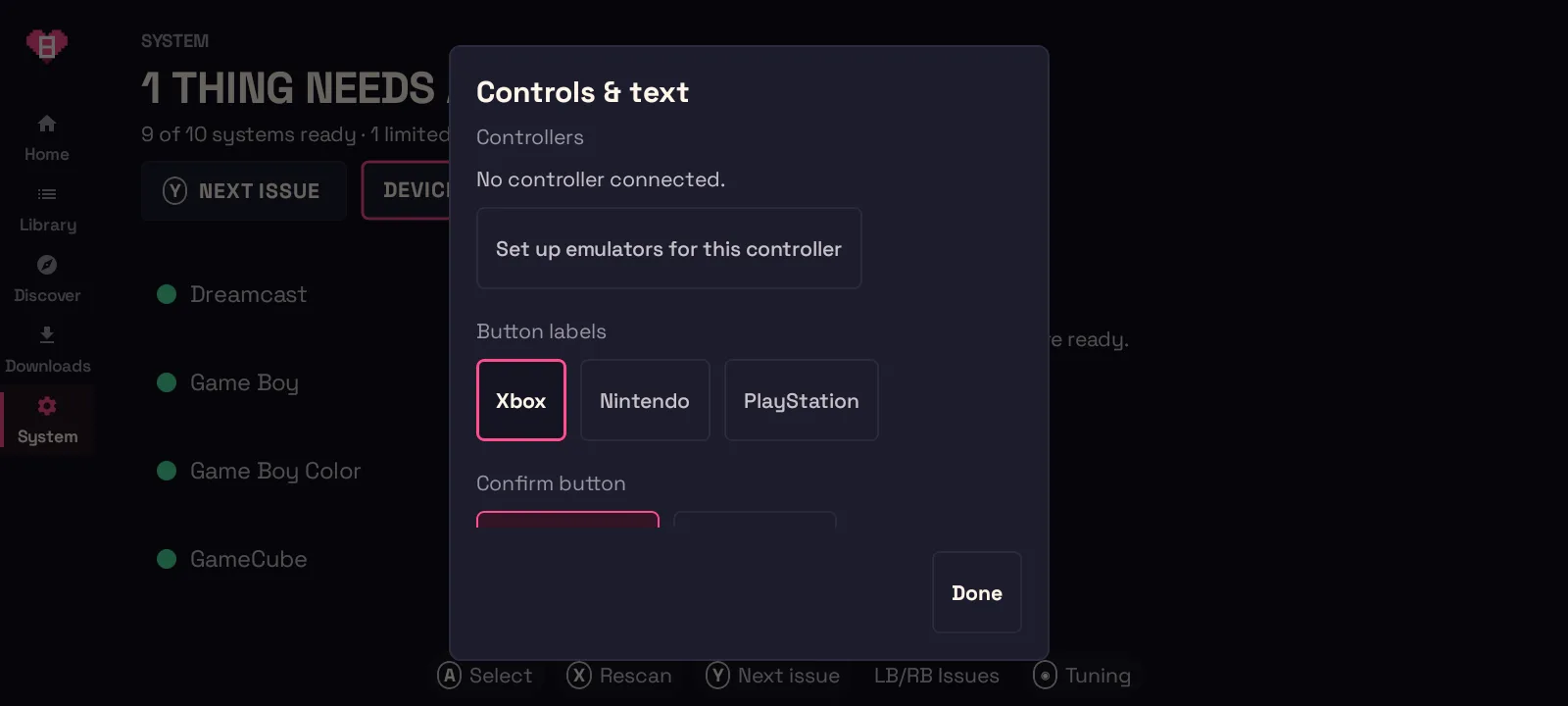
Controller setup runs automatically:
- when a controller connects,
- right before GameBEX starts a standalone emulator, and
- on demand from System → Device → Controls & text size → Set up emulators for this controller, which also shows a status line for each emulator.
GameBEX changes only the few settings it owns in each emulator’s config, and it
keeps a one-time backup of the original file next to it
(<file>.gamebex-backup). Your other emulator settings are left alone.
What’s automatic, per emulator
Section titled “What’s automatic, per emulator”| Emulator | What GameBEX does | Shizuku needed? | Your part |
|---|---|---|---|
| RetroArch (all cores) | Turns on controller autodetect and hides the touch overlay when a pad is connected | No | Nothing |
| Flycast (Dreamcast, NAOMI) | Writes a full button mapping for each connected controller | Yes | Nothing |
| Dolphin (GameCube, Wii) | Turns the touch overlay off | Yes | Map Port 1 once (below) |
| NetherSX2 (PlayStation 2) | Installs a profile whose touch controls auto-hide | Yes | Run Automatic Mapping once per new controller (below) |
| Vita3K (PS Vita) | Nothing to change, because it reads the controller natively | Only to confirm | Nothing |
Other standalone emulators (PPSSPP, melonDS, Azahar, ScummVM, MAME4droid, J2ME Loader) use their own controller settings.
Shizuku
Section titled “Shizuku”Android 11 and newer stop apps from reading or writing other apps’
Android/data folders, even with All files access. That is where Dolphin,
Flycast, NetherSX2, and Vita3K keep their settings. Shizuku
lets GameBEX update those emulator settings with your permission.
- If setup says Start Shizuku to finish setup, Shizuku isn’t running, so start it from the Shizuku app (see Install → Shizuku).
- If it says Allow GameBEX in Shizuku, choose Allow Shizuku access in the Controls dialog and accept the prompt.
- Without root, Shizuku must be started again after each reboot. You only need it when setting up a new controller or a newly installed emulator.
Controller setup in RetroArch doesn’t need Shizuku: GameBEX launches it with its own configuration file. Play together has separate requirements.
One-time steps
Section titled “One-time steps”Two emulators keep button bindings in a form GameBEX can’t safely write for you. Each needs one short step inside the emulator.
NetherSX2 (PlayStation 2)
Section titled “NetherSX2 (PlayStation 2)”The first time you start a PS2 game with a new controller, GameBEX shows a card reminding you of this step. Choose Got it to hide it for that controller, or Don’t show again.
- Start the game, then open NetherSX2’s pause menu → Controller Settings.
- Controller Port 1 → Automatic Mapping → pick your controller.
- That’s it. Touchscreen → Hide With External Controller is already set by GameBEX.
Dolphin (GameCube and Wii)
Section titled “Dolphin (GameCube and Wii)”- Open Dolphin and go to its GameCube Input settings.
- Configure Port 1 and bind your controller’s buttons to it.
- Dolphin remembers the mapping for that controller from then on. (GameBEX has already turned Dolphin’s touch overlay off.)
Button labels and the confirm button
Section titled “Button labels and the confirm button”Under System → Device → Controls & text size:
- Button labels: pick Xbox (A B X Y), Nintendo (B A Y X in the same positions), or PlayStation (✕ ○ □ △, L1/R1). Every on-screen hint relabels immediately to match the buttons printed on your pad.
- Confirm button: Bottom button (default) confirms with the bottom face button and goes back with the right one. Right button swaps them (and swaps the left and top buttons too), for players used to Nintendo consoles. This applies inside GameBEX; emulators keep their own mappings.
- Text size: Default, Large, or Larger (Large is the default), for reading from arm’s length on a handheld.
The dialog shows a live preview of which button confirms and which goes back.